

Automatic (Inactivity) Timeout is Broken
-
Poorly designed user session security
-
Can improperly logout present user(s)
-
Can lead to wasted time with re-login.
-
Leading to FRUSTRATION and wasted productivity and workflow.
-
Users have to unnecessarily trace back where they were in their user journey.
ATO: THE USER'S EXPERIENCE
Automatic Timeout: "Psst, you there?"
Notification Pops up to User:
-
"You were signed out because of inactivity"

-
User Friction
-
I was here the whole time! I was just focused on another tab. Why don't you know I AM HERE!"
-
Now I'm going to have to navigate back to the screen I was viewing on my last session, what a WASTE OF TIME!"
-
Not to mention if 2 step verification is asked of me, now that's gonna be another whole can of worms.
-
THE PROBLEM
Why conventional automatic timeouts fail users and risk data

WASTE OF TIME
ATOs CREATE REAL PRODUCTIVITY LOSS
Forced re-authentications add up. Studies show large productivity costs from authentication friction and password problems — for example some surveys estimate employees spend dozens of hours per year on password resets and re-auth tasks.
BLIND SPOTS
ATOs LEAVE A RISK WINDOW OPEN - AND A FALSE SNESE OF SECURITY
Timeouts only act after the idle period ends. That means an attacker who accesses an unattended device in those minutes still has the active session. Industry guidance recognizes this tradeoff and recommends careful timeout choices rather than one-size-fits-all policies. (“The inactivity timeout SHOULD be no more than 1 hour.”)


COOKIE CUTTER
ATOs ARE BLUNT, COOKIE-CUTTER CONTROL
Timeouts use a fixed clock (e.g., 10–30 minutes idle) not real context. If a user steps away for 2 minutes to consult a colleague, many apps treat that the same as leaving for lunch.
MORE SECURE = MORE FRICTION
ATOs FRUSTRATE USERS AND INCREASE RISKY WORKAROUNDS
When automatic logouts interrupt unsaved work, users create workarounds: disabling security settings, writing passwords on notes, choosing “remember device”, or leaving sessions open — all of which lower security posture. UX and engineering teams repeatedly flag session timeout as a common source of friction.

THE REAL FALLOUT
Why this all matters
Leaving a laptop, tablet or phone unlocked — or assuming standard inactivity timeouts are “good enough” — dramatically raises the chance of data exposure.
LOST WORK & USER FRUSTRATION
Unsaved forms, interrupted processes, lost context — forcing users to restart flows.
SECURITY REGRESSIONS
Users pick insecure workarounds (sticky notes, persistent cookies, “remember device”), increasing the attack surface.
HIGHER SUPPORT COSTS
More password resets, help-desk tickets, and time lost returning users to their workflow.
ATO doesn't provide behavioral presence verification
-
ATO gives users a headache even when it works. It only protects those who genuinely leave their device or session and don't plan on coming back soon.
How would a better, Human-Centric solution, look?
-
It would detect the presence of the user and only initiate security protocols when needed
-
It would enable real-time security, securing the session instantly when the user's presence is not detected.
-
Furthermore it would give real-time access to users the instant they are back at their device, so they don't have to waste time getting back to work where they left off.

INTRODUCING PATENTED FYEO AUTH
The Better Approach: Presence-Aware Protection
Continuously detects the authorized user’s presence
using passive biometric signals and PUA (Persistent User Authentication) algorithms.
When the user is absent and presence not detected
the system instantly obfuscates the screen and secures the session (not by logging the user out, but by making the sensitive content unreadable and blocking access).
When the user is present and in front of device
screens remain fully usable — no forced re-authentication, no interrupted workflows.
Instant return-to-work when the user returns
as soon as the authorized user returns, the session resumes immediately — no lost work, no multi-step re-login.

How FYEO Auth Fixes the Timeout Problem
Real-Time security, not a delayed timer
Automatic timeouts wait for a clock to run out. FYEO reacts instantly to absence and presence — closing the exposure window to the exact moment the user leaves. (No more “I was logged in for 3 minutes after I stepped away.”)
No lost work, no re-entry friction
Because FYEO obfuscates rather than forcing a logout, the session stays alive and stateful. Users return and pick up where they left off.
Lower administrative and support costs
Fewer help-desk calls and password resets, less time lost re-navigating complex flows. The ROI to productivity is immediate.
Defence-in-depth
FYEO complements existing session policies, MFA, and device controls — adding continuous biometric presence as an additional, context-aware signal to decide whether the session should be visible and accessible.
FOR ENGINEERS & PRODUCT TEAMS
Technical and integration highlights
-
SDK-first: Drop-in SDK for web, desktop, and mobile. Minimal developer effort to add FYEO’s presence checks into any app workflow. (White-label capable.)
-
Privacy by design: Local processing of presence signals where required; configurable privacy modes and data retention settings.
-
Works with existing auth stacks: Integrates with your existing identity provider and session management — augmenting, not replacing, established security controls.
-
Low false-positive design: PUA uses multi-modal signals and ML models tuned to minimize interruptions while maximizing detection of unauthorized users. (Continuous-auth literature supports this approach as reducing reliance on single-login security.)
Use cases & real-world examples
HealthCare
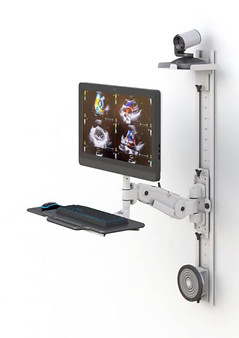
Healthcare clinicians at a nursing station
Nurse steps to a patient’s room for a minute — FYEO obfuscates PHI on the workstation, then restores immediately on return. No re-login, no interrupted patient charting.
SupportTech
Customer support platforms
Agents often switch windows and apps — FYEO prevents screen-snooping without interrupting ticket handling or CRM flows.

FinTech
Financial advisors using dashboards with sensitive PII
Avoids forced logouts during multi-task workflows (video calls, client research), while keeping screens locked when the advisor steps away.

ManufacturingTech
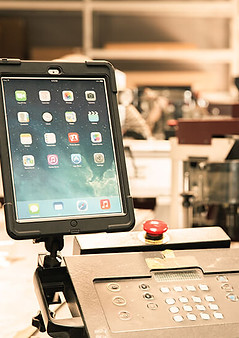
Manufacturing floor tablets
Line operators interact with shop-floor apps; FYEO prevents screen exposure during brief departures but keeps local session state intact.
Characteristic | Automatic Timeout | FYEO Auth |
|---|---|---|
Usability | Breaks workflows | Keeps workflows flowing |
Support costs | Higher (tickets, resets) | Lower (fewer interruptions) |
Integration | Simple but blunt | SDK-based, integrates with IDP and session mgmt |
Window of exposure | Until timer fires | Immediately when absent |
User Friction | High - forced re-login & lost state | Low - instant resume, no lost state |
Response Trigger | Fixed idle clock | Real-time presence detection |

